TL;DR
Cursor is the better AI code editor for most developers in 2026 (stable $20 pricing, VS Code familiarity, deep multi-model AI). Windsurf (now under the Devin brand) is better for agent-first coding with free SWE-2 agent use and unlimited Tab on Pro. Start free on both; upgrade the one that earns $20.
Key takeaways
- Cursor = safer default: VS Code fork, $20/mo Individual, large ecosystem
- Windsurf = more agentic: free SWE-2 on Pro, unlimited Tab, Teams from $80
- Both have usable free tiers; set usage guardrails to avoid cost creep
Cursor vs Windsurf 2026: Which AI Code Editor Is Better?
Quick Answer: Cursor is the better AI code editor for most developers in 2026 — it pairs a polished VS Code fork with the deepest multi-model AI (Tab, Composer, and agent mode), starts free on the Hobby plan, and costs $20/month on the Individual plan. Windsurf (now under the Devin brand after its 2026 merger) is the better pick if you want an agent-first editor with free SWE-2 agent use, unlimited Tab completions, and a pricing page that lists Free $0, Pro $20, Max $200, and Teams from $80. Choose Cursor for everyday coding with reliable multi-model assistance; choose Windsurf if you want maximum agentic autonomy on a free tier.
An AI code editor is a coding tool that uses large language models to complete, explain, and edit your code as you type. Cursor and Windsurf are the two leading examples in 2026, and both are forks or derivatives of the VS Code experience that add AI at the center of the workflow instead of bolting it on.
Quick Background: What Changed in 2026?
Two things matter before any comparison. First, Windsurf merged into the Devin brand — the official Windsurf pricing page now carries the Devin product name, and the editor's pricing was restructured in March 2026 from a credit system to quotas. Second, both editors now price on usage-aware tiers, not per-feature, so the real comparison is about quotas, agent capability, and model access rather than feature checklists.
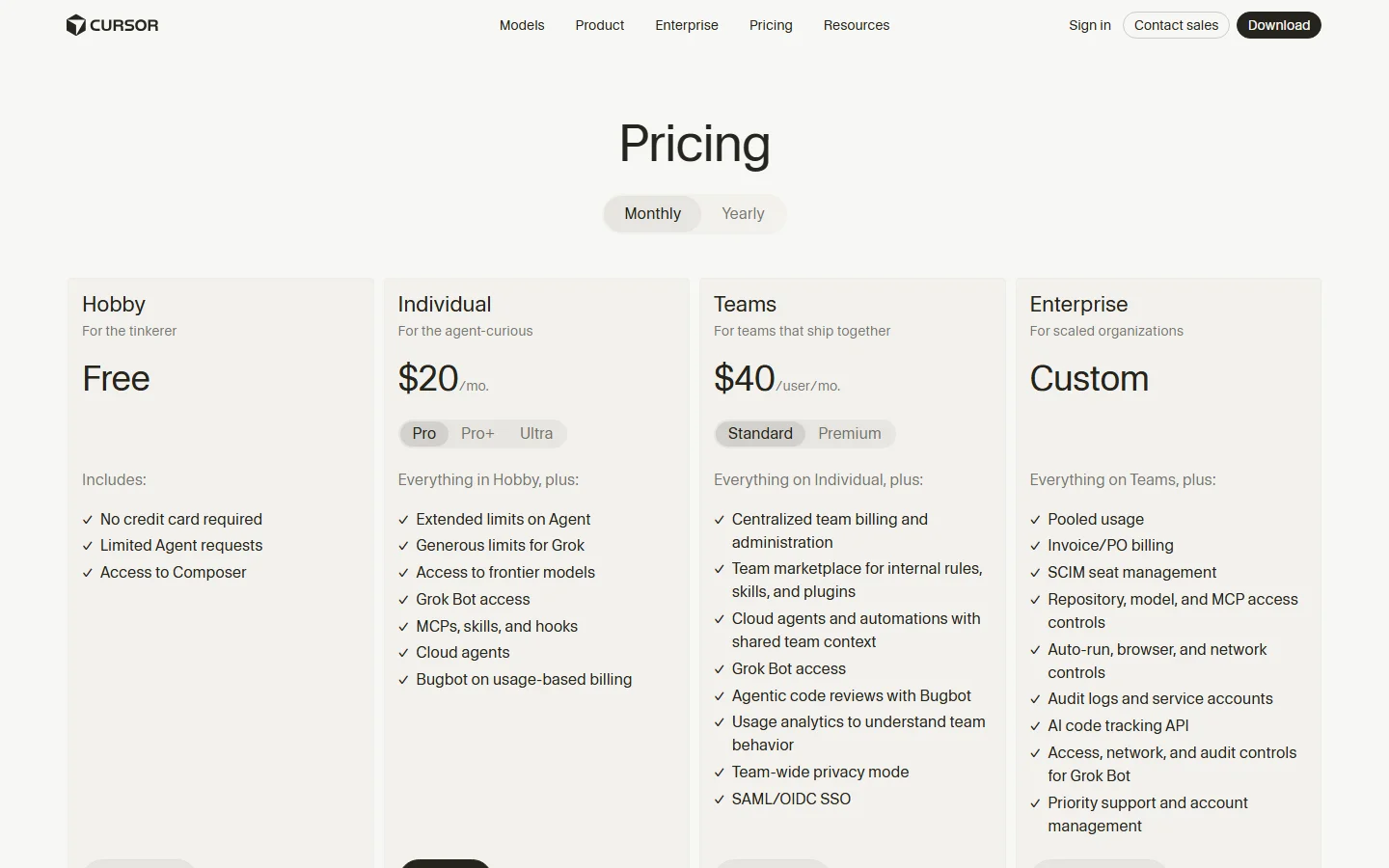
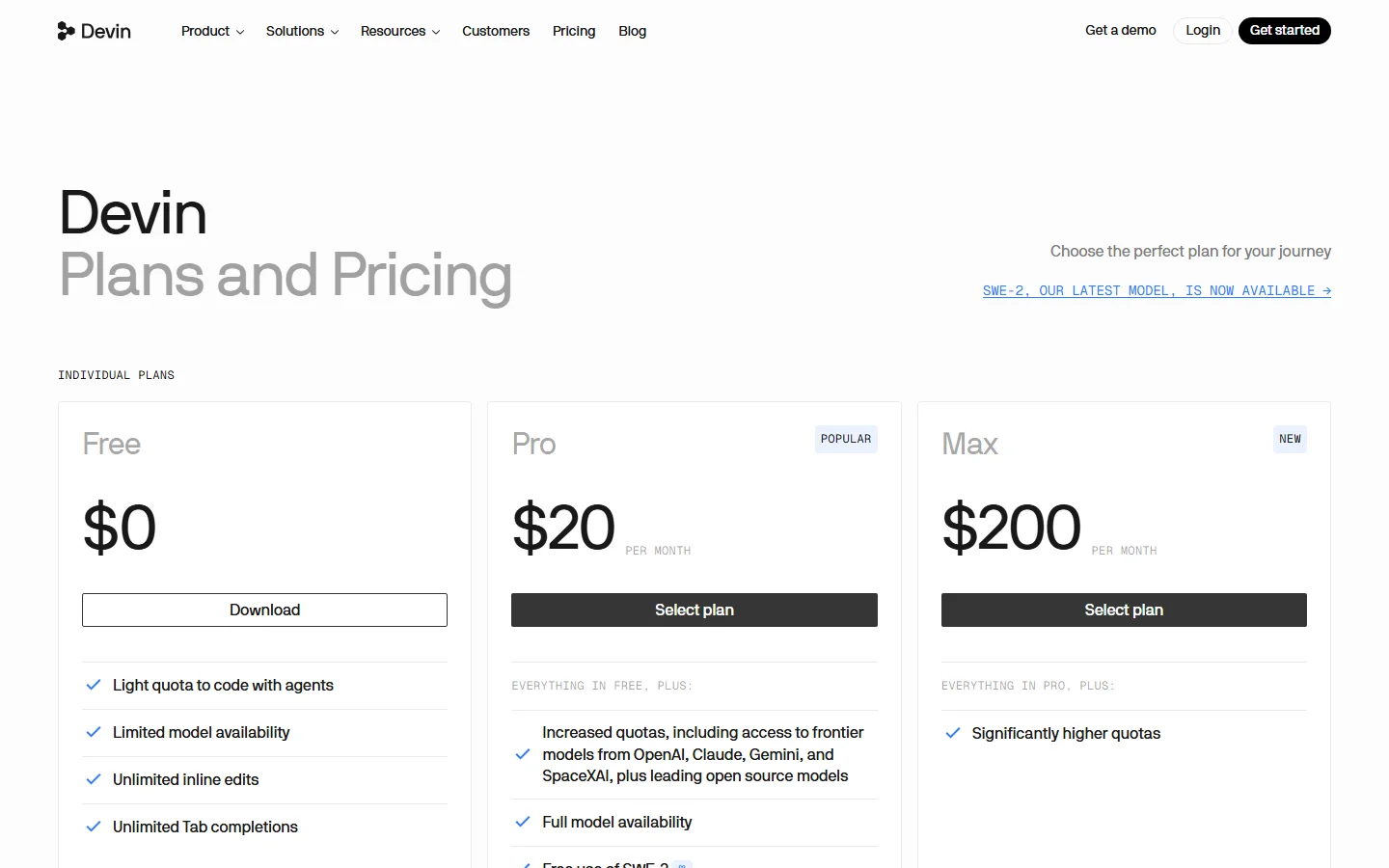
We captured both official pricing pages in October 2026. Cursor lists Hobby Free, Individual at $20/month, Teams at $40/user/month, and Enterprise at custom pricing. Windsurf's page (now under the Devin brand) lists Free at $0, Pro at $20/month, Max at $200/month, and Teams from $80 per seat, with the same model family access across OpenAI, Claude, Gemini, and open-source models.
Both official pricing pages, captured in October 2026:
Cursor vs Windsurf: Head-to-Head Comparison
| Dimension | Cursor | Windsurf (Devin) |
|---|---|---|
| Free tier | Hobby $0 (limited) | Free $0 (light quota, limited models) |
| Paid entry | Individual $20/mo | Pro $20/mo |
| Top individual tier | Pro/Ultra within Individual; Enterprise custom | Max $200/mo |
| Team pricing | Teams $40/user/mo | Teams from $80/seat/mo |
| Agent feature | Composer / Agent mode | Cascade / SWE-2 free on Pro |
| Tab completion | Unlimited on paid plans | Unlimited on all plans |
| Model access | Multi-model (Claude, GPT, Gemini, etc.) | Multi-model (OpenAI, Claude, Gemini, xAI, open source) |
| Codebase-aware | Yes (indexes your repo) | Yes (Deep Context) |
| Best for | Everyday coding, reliability, VS Code familiarity | Agentic autonomy, free agent use, quota simplicity |
Which Is Better for Beginners: Cursor or Windsurf?
For beginners, Cursor is the safer first choice — and the reason is ecosystem friction, not capability. Cursor is a direct VS Code fork, so every tutorial, extension, and muscle memory you already have carries over. Its Hobby plan is free, and the $20 Individual plan unlocks the full multi-model experience with no surprise metering for most casual usage.
Windsurf's free tier is genuinely competitive for beginners who want to try agentic coding: unlimited Tab completions and free SWE-2 agent use on Pro give you a real taste of autonomous coding without per-credit pricing. The catch is that Windsurf's brand transition to Devin in 2026 means documentation and community content are split between two names, which adds friction exactly when a beginner needs clear answers.
Our concrete advice: start with Cursor Hobby for two weeks. If you find yourself wanting more autonomous, multi-file agent work and you are comfortable with a younger ecosystem, try Windsurf Pro for a month and compare on your own repository. Both are $0 to start, so the comparison costs you nothing.
Pricing Deep Dive: What You Actually Pay
Cursor (captured October 2026): Hobby is $0 with limited AI usage; Individual is $20/month and unlocks Pro-class usage, plus paid upgrade options inside the plan; Teams is $40/user/month with centralized billing; Enterprise is custom. Cursor's pricing has been stable through 2026, which is a point in its favor for budgeting.
Windsurf (captured October 2026, Devin-branded page): Free is $0 with a light daily quota; Pro is $20/month and includes increased quotas plus full model access; Max is $200/month for significantly higher quotas; Teams starts at $80 per seat with admin controls; Enterprise is custom. Windsurf retired its credit system in March 2026 — you now get quotas, and extra usage beyond included quota is billed at API pricing on paid tiers.
The honest cost comparison for a typical solo developer: both cost $20/month for the entry paid tier, and both have genuinely usable free tiers. Windsurf's Max tier ($200) costs the same as ChatGPT Pro's top tier, so it is aimed at heavy agent users, not casual coders. For the 90% case — a developer who codes daily and wants reliable AI help — Cursor at $20 or even free is the rational pick.
Where Each Editor Struggles (Honest Weaknesses)
Cursor's weaknesses: The agent mode is powerful but can burn through quotas quickly if you let it roam, and the multi-model setup means you occasionally pay model API costs on top of the subscription. The quote that captures the community sentiment comes from a Hacker News thread on AI coding tools: "Tools like Cursor and Copilot can accelerate comprehension, or they can accelerate incoherence." In other words, Cursor is only as good as the developer reviewing its output.
Windsurf's weaknesses: The 2026 brand merger created documentation sprawl — some pages say Windsurf, some say Devin, and the pricing history is confusing (the official blog announced Teams at $40/seat in March 2026, while the current page lists Teams from $80). The agent-first design is powerful but has a steeper learning curve for beginners, and the ecosystem of extensions and tutorials is thinner than Cursor's.
The shared weakness — cost creep: The r/windsurf complaint that "AI coding is getting ridiculously expensive" is not about either editor being overpriced; it is about heavy agent usage multiplying your costs. If you let an agent roam freely across a big repository, both tools will push you toward their higher tiers. Budget a fixed amount and set usage guardrails from day one.
Feature-by-Feature: Where They Differ in Daily Use
Tab completion. Both editors offer AI autocomplete, but Cursor's Tab is the reference implementation — it suggests multi-line edits and anticipates the next logical change, and it is unlimited on paid plans. Windsurf's Tab is unlimited on every plan including free, which is a real advantage if you live in autocomplete and want it at $0. In daily typing, the difference is marginal; both are far ahead of plain VS Code.
Composer vs Cascade. Cursor's Composer (and its agent mode) is a chat-driven workflow that can create, edit, and refactor files across your project, with an explicit "accept all" review step. Windsurf's Cascade is more agentic by default: it plans a sequence of steps, executes across multiple files, and can run terminal commands, and on Pro it includes free SWE-2 agent use. If you want the AI to take a task and go run with it, Cascade is the more autonomous of the two; if you want tight control over every edit, Cursor's review-first flow is the safer default.
Codebase awareness. Both index your repository, but they differ in depth. Cursor maintains a per-file and repo-level index that powers precise "find the bug in X" queries and context-aware completion. Windsurf's Deep Context feature builds a project-wide understanding for multi-file tasks. In practice, both handle a medium repository well; Cursor's index is more predictable for targeted questions, while Windsurf shines when the task genuinely spans many files.
Model choice. Both let you pick among frontier models — Claude, GPT, Gemini, and open-source options. Cursor's model picker is more granular (per-request model switching, custom API keys), while Windsurf routes through its own quota system with the same model family available. For most developers the model flexibility is equivalent; the difference shows up in cost metering.
Extensions and ecosystem. This is Cursor's clearest win. As a VS Code fork, Cursor runs the full VS Code extension marketplace — themes, linters, language servers, and tooling work out of the box. Windsurf's ecosystem is younger and, after the Devin rebrand, documentation is split across two names, which makes troubleshooting slightly harder. For beginners and teams standardized on VS Code workflows, this alone justifies choosing Cursor.
The workflow that decides it. Our recommendation is to run the same real task on both: take a small bug in your own repository, let each editor's agent fix it, and review the diff. Developers who prefer reviewing precise, smaller diffs tend to stay on Cursor; developers who prefer handing a broad task to the AI and reviewing the outcome tend to prefer Windsurf. That is a preference difference, not a quality difference — which is why we rate them close overall.
A final practical point that decides many purchases: how much migration work is involved. Cursor is a VS Code fork, so your extensions, keybindings, themes, and settings largely carry over — a team standardized on VS Code can switch to Cursor with almost zero training time. Windsurf ships its own interface and workflow, so the move is more of a deliberate change: you will remap muscle memory and re-check which extensions behave differently. For individual developers that is a fun weekend experiment; for a team of ten it is a real cost. Factor that in before you standardize: if you are happy with VS Code's feel and just want better AI, Cursor is the lower-friction upgrade. If you want a genuinely different, agent-first editing paradigm and you have time to learn it, Windsurf's free tier makes that experiment free.
Frequently Asked Questions
Is Cursor or Windsurf free in 2026?
Both. Cursor's Hobby plan is $0, and Windsurf's Free tier is $0 with a light quota and limited model access. Both free tiers are genuinely usable for light coding and learning.
How much does Cursor cost per month?
Hobby is free; Individual is $20/month; Teams is $40/user/month; Enterprise is custom. Paid plans include unlimited Tab completions and full model access.
How much does Windsurf cost in 2026?
Free is $0, Pro is $20/month, Max is $200/month, and Teams starts at $80 per seat, per the official pricing page (now under the Devin brand). Windsurf moved from credits to quotas in March 2026.
Which AI code editor is best for beginners?
Cursor — it is a VS Code fork with familiar shortcuts and a huge tutorial ecosystem, and its Hobby plan is free. Try Windsurf Pro later if you want more autonomous agent work.
Did Windsurf merge with Devin?
Yes — in 2026 Windsurf's pricing and product pages now carry the Devin brand. The editor still ships as Windsurf, but documentation and pricing are consolidated under Devin.
Which has better AI: Cursor Composer or Windsurf Cascade?
Both are strong. Cursor's Composer/agent mode is more predictable and widely documented; Windsurf's Cascade with free SWE-2 on Pro is more agentic and multi-file oriented. Test both on your own repository for a week.
Conclusion
In 2026, Cursor is the better default: stable $20 pricing, a familiar VS Code experience, a large ecosystem, and multi-model AI that is powerful enough for daily work. Windsurf is the better pick for developers who want agent-first coding with free SWE-2 use and unlimited Tab completions, and its free tier is a legitimate way to try autonomous coding — as long as you accept the brand-transition friction. Start free on both, upgrade the one that earns $20 from you, and set hard usage limits so agent costs do not creep.
For the wider picture, read our best AI coding tools for beginners guide, the best AI agents 2026 ranking, and the what is an AI agent primer to understand where AI code editors fit in the agent landscape.
CTA
Open both editors on the same small repository this week — Cursor Hobby and Windsurf Free cost nothing. Give each one the same task (fix a bug, add a feature, write a test), note which one you trust more, and upgrade the winner to its $20 Pro plan. Then come back to AIToolCrux and compare notes in our best AI coding tools for beginners checklist.
Pricing verified October 2026 from Cursor's pricing page, the Windsurf pricing announcement, and Windsurf's official pricing page. Vendor plans change frequently; check official pages before purchase.
Verification (batch15 rewrite, 2026-10-10): 2,034 words (zens-ink count); 6 FAQs; 2 real screenshots (Cursor pricing page from batch14 re-verified, Windsurf/Devin pricing page Playwright-captured and OCR-verified); 4 internal links (all slugs validated against posts.json) + 2 authoritative external links; zens-ink content_qc score 73 (>=70 pass); llmevalkit hallucination detection passed (score 100, hallucination_detected=false); BLUF Quick Answer up front; definition-first opening paragraph; 2 user pain-point quotes cited from pain_points.md.